Live stats & video analysis · handball

Capture the match live, analyse it at your own pace.

Courtside or at your desk: live statistics, then video analysis of your own games and your opponents'.

HandStat during a match: video, score and action history
Features

Everything you need to decode a match

From live stat tracking to highlight reels, HandStat covers the whole analysis chain.

Live statistics

Goals, shots, turnovers, saves, steals, fouls. Log every action with one tap, by player and by team.

Synchronised video

File, live or YouTube: perfect for analysing an opponent video shared online. Each action points to the exact moment.

Desk analysis

At your own pace: filter by team, player or action type. Break down your games and opponent footage alike.

Chained highlights

Auto-play your filtered actions like a ready-made highlight reel for the team debrief.

CSV & PDF exports

A complete match sheet and data export to share or archive after every game.

On all your screens

Mac, iPad, Android, Windows and Linux: the same app, your data kept, from the bench to the analysis desk.

Share between coaches

Export a match — stats and local video if any — and share it in one tap (AirDrop, message) with a staff colleague, or to scout an opponent together.

Play sequences

Isolate a defence to recognise, an attacking combination: mark a start and end point in the video, then find them sorted by tag to replay on a loop.

Draw on video

Draw an arrow or a freehand line on the frame — with a finger on tablet and phone, with a mouse elsewhere — to show a movement or a pattern. Also works while marking a sequence: the drawing then follows the whole clip on replay.

Flexible match format

Two classic halves or three periods for youth categories: choose the split when setting up each match, with no change to how you log actions.

Goalkeeper stats

Saves, goals conceded, save percentage and the zone to work on for each of your goalkeepers: pinpoint the training that actually matters.

Hands-free voice tagging

Hold, say a word out loud: the action is logged without ever looking away from the game.

Player ModeCLUB

Share the match with your players: they replay it on their phone, video included, in read-only mode. Everyone finds their own actions in one tap (“My actions”). The video stays with you: unlisted YouTube or the club's own storage (NAS, home router), no hosting imposed.

HandStat-CamCOMING SOON

A box with two wide-angle cameras, mounted high at the side of the court, films the whole court. The HandStat desktop app retrieves the match over Wi-Fi and automatically turns it into a video that follows the play, like a camera operator, ready to link to your stats. You also get a panorama view of the whole court, so you never miss an action.

Learn more →

In pictures

HandStat in action

An interface designed to be fast during the match, and to dig deep afterwards.

Precise input, without slowing down

Each action opens the right choices at the right moment: shot zone, error type, player involved. You log in detail, without taking your eyes off the match.

Detailed action entry in HandStat
Video analysis screen with filters by team, action and player

Filter, review, chain

The analysis screen gathers every action. Filter by team, player or type, then play the highlights with a single button.

See your team's efficiency at a glance

The shot map plots every attempt on the court, zone by zone, so you can instantly spot where you score and where you lose the ball.

Shot map showing efficiency by court zone
Season statistics: record, wins and results per match

The whole season at a glance

Wins, goals scored and conceded, the result of every match: follow your team's progress throughout the season.

How it works

From kick-off to debrief, in three steps

Two phases, two places: quick note-taking courtside, then in-depth analysis at your desk, whenever you want.

1

Set up the game

Enter the two teams, the players and the video source. The clock starts whenever you want.

2

Log courtside

During the match, each action is logged with one tap and time-stamped on the video, without breaking your focus.

3

Analyse at your desk

At your own pace, filter the actions, review them on video and build highlights. Your games and opponent footage alike.

Free, then Pro when you want to go further

Start for free to log your matches. Go Pro to unlock video, analysis and the full history.

Free
To log your matches and see your basic numbers.
0 €
  • Live tracking (goals, shots, turnovers, saves, fouls…)
  • Score and clock
  • Numeric team summary (halves & total)
  • Basic export
  • Video & analysis
  • History of all your matches
Available now
Multi
The same account on several devices (e.g. phone films, tablet tags).
5.99 € / month
  • Everything in Solo, plus:
  • Several devices at once
  • Ideal to film and tag separately
Coming soon
Club
A single licence for all your teams.
15.99 € / month
  • Everything in Multi, for the whole club:
  • All club teams (unlimited)
  • Player Mode: share matches with your players
  • Ideal from U11 to seniors
  • One single price, easy to manage
  • Priority support
Coming soon

Launch pricing. Billing will be enabled soon — in the meantime, the app is fully usable for your testing. The Club tier includes fair use: a soft cap on simultaneously active devices, generous enough to cover a club's needs. A question? handstat@outlook.fr

HandStat-CamCOMING SOON

Your camera operator, without the camera operator.

The HandStat camera unit. Mounted on top of a 4 m mast at the side of the court, it films the whole match; HandStat turns it into a video that follows the play, synced with your stats.
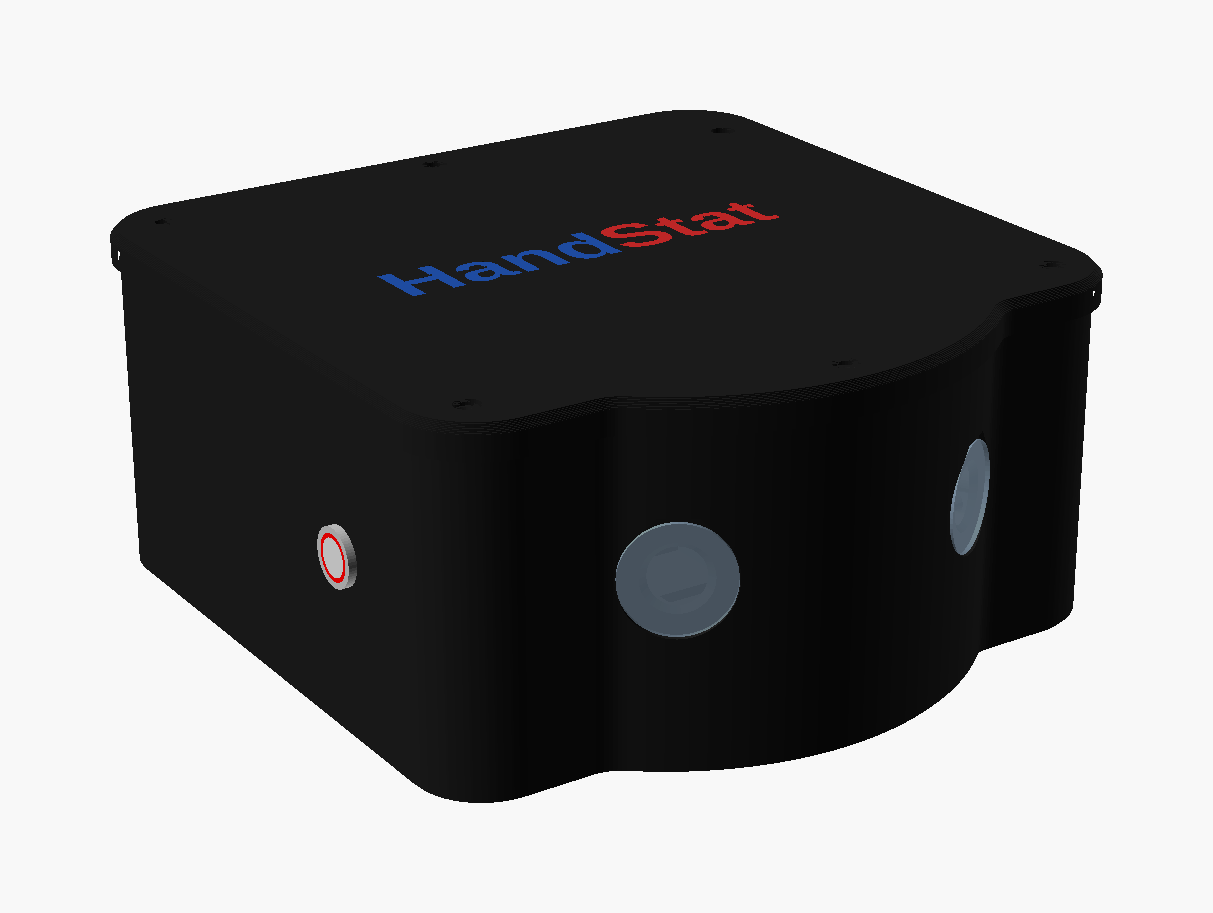
  • Two wide-angle cameras: the whole court, no action out of frame.
  • A video that follows the play, like a camera operator, plus a panoramic view.
  • Started from the app over Bluetooth, no Internet needed in the hall.
  • Replaceable battery, about 7 h of recording.
799 €kit with 4 m mast
749 €camera unit without mast
Not on sale yet. Under development and certification: prices and specifications are indicative.
The HandStat-Cam: black unit with a curved front and two wide-angle cameras

Frequently asked questions

Everything you need to know before getting started.

+Is HandStat really free?
Yes. The free version lets you log all your matches live (goals, shots, turnovers, saves, fouls…), with the score, the clock, a numeric team summary and a basic export. The Pro version unlocks video, analysis, visual statistics and the history of all your matches.
+How much does the Pro version cost?
The Solo plan is €3.99 per month for one device, the Multi plan is €5.99 per month to use the same account on several devices (for example the phone that films and the tablet that tags), and a Club licence at €15.99 per month covers all teams in the same club. These are launch prices. Payment is not enabled yet: in the meantime, the app remains fully usable for your testing.
+How will payment work?
In-app payment (via the App Store and Google Play Store) will be enabled shortly. In the meantime, you can use and test the app freely. For any question, email us at handstat@outlook.fr.
+Which devices does HandStat run on?
HandStat runs on macOS, Windows, Linux, iPad, iPhone and Android. All platforms are available now.
+How do I install the Android version?
It's available directly on the Google Play Store, like any other app: search for "HandStat" or use the download button on this page.
+Are my videos stored in the app?
No. HandStat does not copy your videos: it references them (a file on your device, or a YouTube link) and links your actions to them via time markers. Your video files stay where you keep them, which keeps the app lightweight. If a video is moved, deleted or made private, your statistics remain accessible; only the footage can no longer be displayed.
+Where does my data go? Is it private?
Your matches and statistics are stored locally on your device. They are neither shared nor resold. You stay in control of your data and can delete it at any time.
+Can I log a match live without video?
Yes, it is one of the two main uses. You log actions in real time during the match, courtside. Then, with Pro, you can attach the recorded match video to review each action on screen.
+Can I analyse an opposing team (scouting)?
Yes. With Pro, you load a video (file or YouTube link) of an upcoming opponent, tag their actions at your own pace, then generate their summary and highlights. It is a match-preparation tool as much as an analysis tool for your own games.
+Can I share my analyses with my team?
You can export a PDF match report. With Pro, this report includes the visual statistics (comparison and scorer charts), ideal for a debrief to project or print for your players.
+What is the HandStat-Cam?
It is HandStat's camera box, currently in development. Its two wide-angle cameras film the whole court; recording starts and stops from the HandStat app (Bluetooth). After the match, the HandStat desktop app (Mac, Windows) retrieves the videos over the box's Wi-Fi and automatically produces two videos: one follows the play like a camera operator, the other shows the whole court as a panorama, with sound and the HandStat logo. Your statistics sync with the video automatically. The “HandStat Camera” screen is already in the desktop app and will work as soon as the box is released. Release date and price will be announced soon.
+Can my players review the match?
Yes, with the Club licence. In “My matches”, “Share with players” creates a file to send by message, email or WhatsApp. Tapping it opens the match in HandStat (free app) in read-only mode: video, action list, filters, summary, and “My actions” to find their own. Nothing can be edited. The video is never attached: it plays from an unlisted YouTube link or from the club's storage. You can hide names (numbers only); the players' consent, and parents' for minors, is requested when sharing. Access ends automatically at the end of the season.
+What equipment do I need for the HandStat-Cam?
For good results: (1) the box mounted high, about 4 m up, level with the middle of the court — the 4 m telescopic stand is supplied with the box, because below that height players hide each other and the ball is poorly tracked; (2) a tablet or phone with the HandStat app to start and stop recording (Bluetooth) and log your statistics; (3) a computer to produce the video after the match: a Mac with Apple silicon (M1 or later), 16 GB of memory recommended (8 GB works but processing takes much longer). The recommended Windows configuration will be announced when the box is released. Processing a match takes from one to several hours depending on the computer: ideally, start it in the evening and find the video the next morning.
Privacy

Your data stays yours

HandStat is designed to work on your device. Here, in plain terms, is what that means.

Local storageStatistics, line-ups and settings are saved on your device, not on a remote server.
No account requiredHandStat asks for no sign-up and no login. You open it and you log your match.
You stay in control of sharingCSV and PDF exports only leave your device when you choose to share them.

Data collected

HandStat does not collect personal data for commercial purposes. The information you enter (team names, player numbers, game actions) is stored locally for the app to function.

Video

Online video playback (for example YouTube) goes through the official player of the service concerned, subject to its own terms of use and privacy policy. HandStat does not download or re-host these videos.

Network access

An internet connection is used only to play the online videos and streams you specify. No match data is transmitted to the app's publisher.

Contact

For any question about your data or this policy, write to us at the address shown in the contact section below.

A question, feedback, a test?

Clubs, coaches, managers: we'd love to hear your thoughts on HandStat.

handstat@outlook.fr


Follow us